
Help
Inbound Workflow Diagram
This diagram is the recommended decision flow for inbound stock and stock corrections in ParcelPilot.
Use it as the rule of thumb when deciding between Inventory Inbounds, Receipts, Returns, Collections, and Inventory Adjustments.
Admin links in this guide are written as relative paths so they work on tenant subdomains as well as the main ParcelPilot host. If you want the links to open inside a specific tenant admin, open Help Centre on that tenant's own domain first.
Diagram
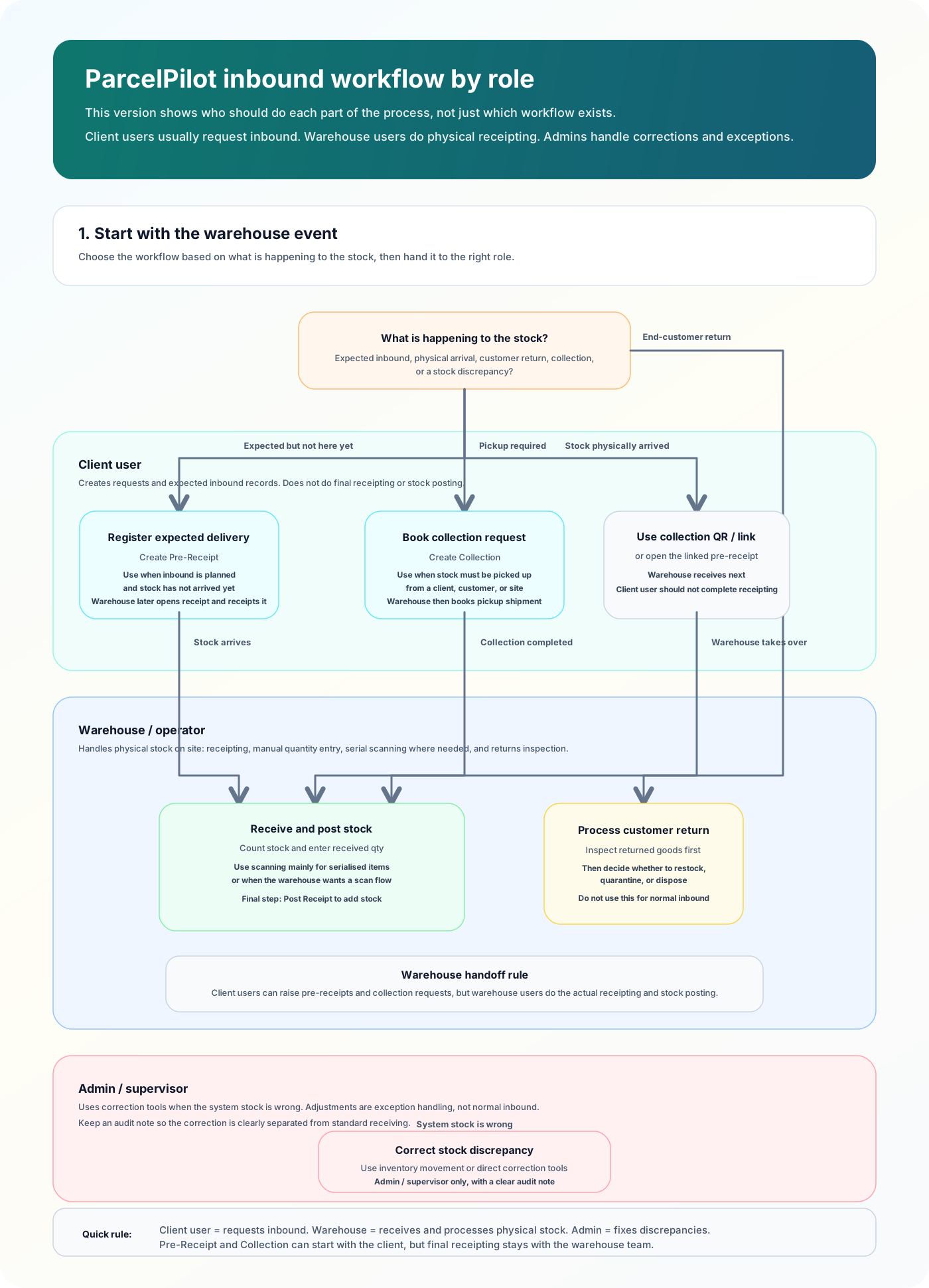
Action routes in ParcelPilot
- Planned inbound from a client: open Inventory Inbounds
- Controlled inbound receiving: start from the Inventory Inbound, click Start Receiving, and finish on the linked receipt with Complete Receiving
- Existing open standalone or legacy receipt: open Receipts, count the stock, enter the receipt manually, and use Mobile stock-in / Scan Items when scanning is needed
- Collection pickup flow: open Collections, book the pickup shipment, then use Create pre-receipt or the collection's Mobile stock-in QR/link
- Stock has arrived with no pre-advice: open Create Receipt, or use Scan stock in when you want the scanning workflow
- Warehouse receiving screen: open Scan stock in mainly for serialised items or when you want to scan into the receipt
Quick rules
- Use Inventory Inbound when stock is expected but not physically in the building yet.
- Use Receipt when stock has actually arrived and should be booked in now.
- Use Return Order only when goods are coming back from the end customer and may need inspection or quarantine.
- Use Collection when stock has to be picked up from somewhere else before it can be received.
- Use Inventory Adjustment / Record inventory adjustment only for correcting a stock discrepancy, not as a normal inbound route.
Common mistakes this avoids
- Creating a Return when the stock should have been receipted as normal inbound.
- Skipping the Inventory Inbound step for planned inbound deliveries.
- Using Inventory Adjustments to add stock that should have arrived through a receipt.
- Using Collections and Receipts interchangeably when they serve different purposes.
Practical interpretation
- Client user: usually starts with Register Expected Delivery on Inventory Inbounds.
- Warehouse team: usually works from Inventory Inbounds, the controlled receipt, Scan Stock In for serialised/scanned flows, Complete Receiving for controlled inbounds, Post Receipt for standalone receipts, and Process Customer Return.
- Admin / supervisor: can use correction tools when the system stock is wrong and an audit-backed adjustment is required.